




















Back
View all
All posts

Azure DevOps Confluence Cloud Connector

April 12, 2022
<a href="https://www.freepik.com/free-vector/business-team-brainstorm-idea-lightbulb-from-jigsaw-working-team-collaboration-enterprise-cooperation-colleagues-mutual-assistance-concept-pinkish-coral-bluevector-isolated-illustration_11667116.htm#query=collaboration&position=2&from_view=keyword&track=sph&uuid=21ea3c1d-7461-49c7-9157-5822c4372896">Image by vectorjuice</a> on Freepik

Does your team use Azure DevOps for work management and Confluence for documentation management? If so, this article is for you and learn here how to improve your technical documentation in Confluence and bring real-time information from Azure DevOps into Confluence pages and blog posts.

Enrich your technical specifications with Azure DevOps work item details

With Azure DevOps Confluence Connector connected you can copy a link to an Azure DevOps work item and paste it in Confluence page to get real-time information about the owner, statuses and other Azure DevOps work item details.

Below is an example of the rendered work item in Confluence.

Azure DevOps single work item active

Or if the Azure DevOps work item was not picked up yet.

Azure DevOps single work item unassigned

When you have linked Azure DevOps work items to the Confluence page you can understand the status of the linked tasks without leaving Confluence, which increases productivity of your team and your own.

Display the work items of the Azure DevOps shared Query

When you got a Confluence project or team page and related work items are saves as an Azure DevOps shared Query you can display items directly on the page to reduce the context switching and stay on top of the current project's work items.
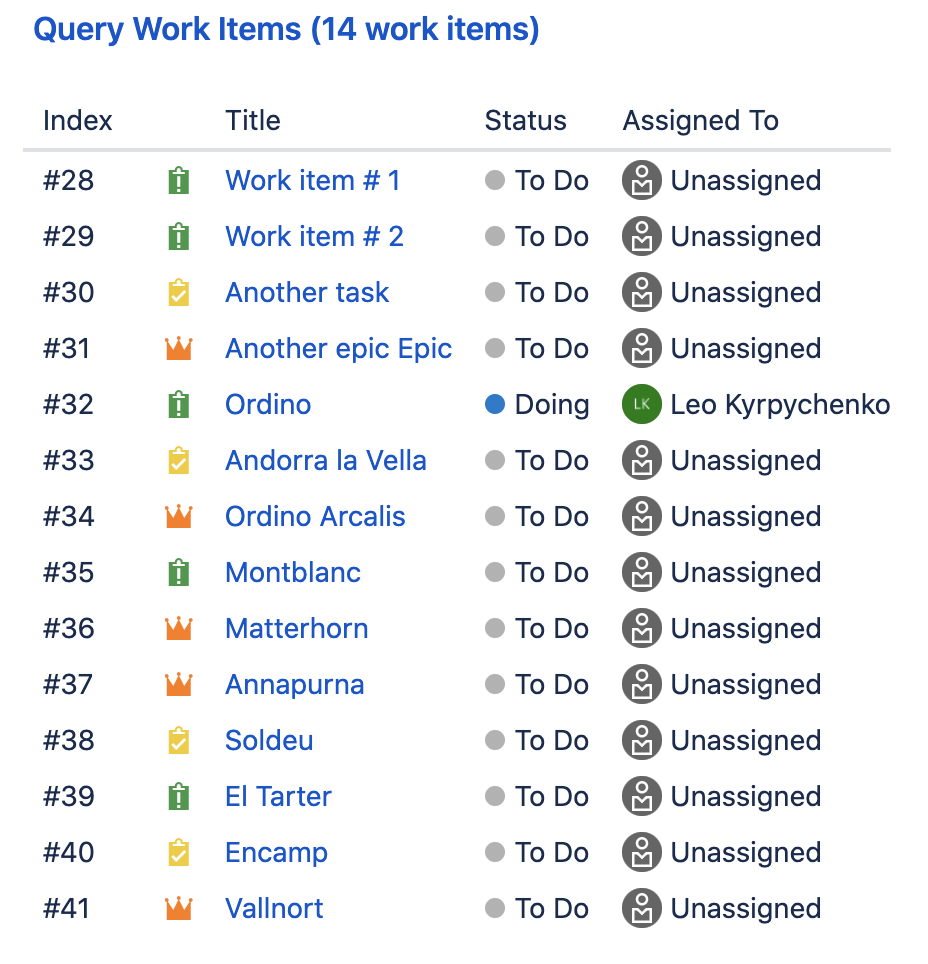
Azure DevOps shared Query

With a shared Azure DevOps Query you can display items that correspond to the required filters which drastically simplifies the work flow.

If you see anything is missing in Azure DevOps Confluence Connector - please reach out to Move Work Forward.

Articles you might like

GitHub and GitLab Jira integration for Jira Data Center
June 28, 2023
GitHub and GitLab Jira integration for Jira Data Center
In this post, you can learn about Jira Data Center performance testing of GitHub and GitLab Jira integration App.
Read more >
Get notifications into Microsoft Teams from Questions and Answers Apps for Atlassian Confluence
February 18, 2022
Get notifications into Microsoft Teams from Questions and Answers Apps for Atlassian Confluence
Do you want to receive Microsoft Teams notifications about new questions and answers in Confluence? Read on to find out how to set this up.
Read more >
Bring information from GitHub into Confluence
March 6, 2024
Bring information from GitHub into Confluence
Learn how to extract your technical documentation, files, and source code from Github to Confluence by integrating these two apps together. Read more.
Read more >

Articles you might like

New blog posts

Sales, Support, and Procurement Don’t Need CAD Software - They Need Answers
January 9, 2026
Sales, Support, and Procurement Don’t Need CAD Software - They Need Answers
Sales, support, and procurement do not need CAD software.They need clarity, speed, and confidence.When CAD files are accessible where work happens - email, tickets, and documentation, teams move faster without sacrificing accuracy.Enable CAD visibility for business teams—without adding CAD complexity‍
Read more >
When CAD Files Break the Workflow: How Non-Engineers Get Stuck Between Email, Jira, and Confluence
January 9, 2026
When CAD Files Break the Workflow: How Non-Engineers Get Stuck Between Email, Jira, and Confluence
Most modern products are designed in CAD tools - but most decisions about those products are not made in CAD tools.
Read more >
Why Design Reviews Fail Outside Engineering — and How to Fix Them
January 9, 2026
Why Design Reviews Fail Outside Engineering — and How to Fix Them
Design reviews fail when stakeholders cannot see what they are reviewing.They succeed when CAD files are accessible, interactive, and embedded in everyday tools.Making CAD models visible beyond engineering is not a technical upgrade—it is a collaboration upgrade.Make design reviews visual, accessible, and decision-driven.
Read more >
Get productivity tips delivered straight to your inbox
Thank you! Your submission has been received!
Oops! Something went wrong while submitting the form.
Atlassian Logo
Platinum Marketplace Partner
AICPA Logo
SOC 2 Type II Certified
Gitlab Logo
GitLab Official partner
EU GDPR Logo
EU GDPR Compliant
Google Logo
Google Partner
Microsoft Logo
Microsoft Partner
