Back
View all

Numbered Headings for Monday Workdocs

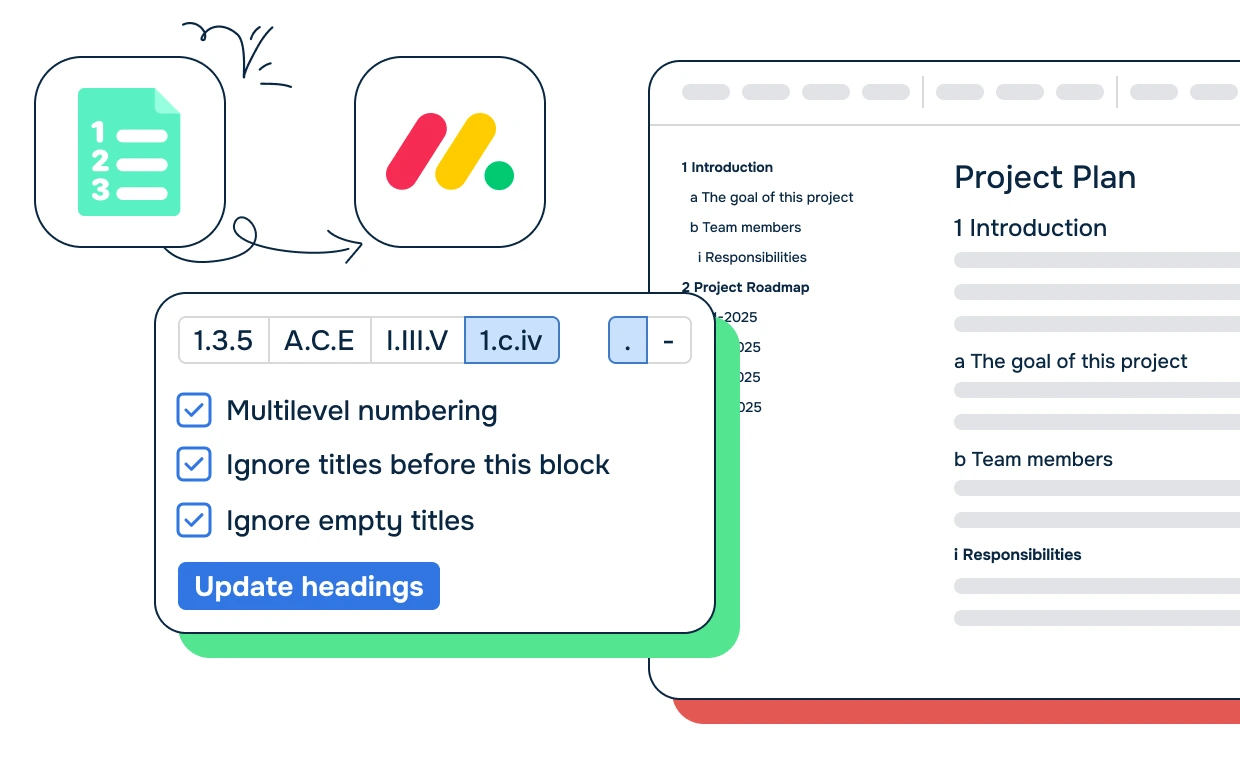
Automatically numbering all the titles within your document based on your preferences

Numbered Headings for Monday Workdocs product page hero image
Platinum Marketplace Partner
SOC 2 Type II Certified
GitLab Official partner
EU GDPR Compliant
SOC 2 Type II Certified
EU GDPR Compliant
Google Partner
Atlassian Marketplace Partner
Join 7,500+ organizations in improving team transparency and productivity.
Let's Move Work Forward together.

Automatic Numbering

  • Automatic Numbering: Our app selects all the titles in your document and numbers them according to your preferences.
  • Customizable Numbering Styles: Choose to have H1 titles numbered with digits, H2 titles numbered with letters, and H3 titles numbered with Roman numerals.
  • Flexible Numbering Options

  • Flexible Numbering Options: Customize your document titles as numbered lists with the choice of using all numbers, all letters, or a combination of both.
  • Personalization: Tailor your documents to your preferences, making them more organized and easier to read.
  • Enhanced Document Management: Make your workdocs more organized and easy to navigate with our app.
  • Try For Free

    Have questions? Watch the demo

    Solving the challenge of disorganized workdocs, our app is the ultimate solution for streamlining your document management.

    Need to talk to a person? Schedule a free consultation with a member of our team.
    Schedule a consultation

    Use cases

    Creating Professional Technical Documentation

    Technical teams create detailed documentation in Monday Workdocs but lack automatic heading numbering. Manual numbering is tedious and breaks when content is reorganized.

    The challenge: Heading numbers must be manually updated when sections are moved or deleted, large documents become difficult to navigate without proper numbering, and cross-references break when section numbers change.

    How Numbered Headings for Monday Workdocs helps:

    The result: Technical documentation looks professional and is easier to navigate, teams reduce time spent on manual formatting, and documentation stays consistent as content evolves and sections are reorganized.

    Improving Document Navigation and References

    Large documents in Monday Workdocs need clear structure for readers to find information. Without automatic heading numbering, documents become difficult to navigate and cross-reference.

    The challenge: Readers can't quickly locate sections without heading numbers, cross-references are ambiguous without clear section numbering, and table of contents become unreliable when heading numbers change.

    How Numbered Headings for Monday Workdocs helps:

    The result: Documents become more user-friendly and easier to navigate, readers find information faster, and cross-references remain valid even when document content is reorganized.

    Standardizing Documentation Format Across Teams

    Different teams format documentation inconsistently, making it difficult for readers to navigate across documents. Standardized heading numbering improves consistency organization-wide.

    The challenge: Documentation styles vary between teams, readers must learn different document structures for each team's work, and maintaining consistent standards requires manual coordination.

    How Numbered Headings for Monday Workdocs helps:

    The result: Documentation becomes consistent across teams, readers navigate any document using familiar structure, and teams reduce time spent on manual formatting and consistency reviews.

    Security is a top priority

    Data Privacy

    We prioritize customer data privacy with GDPR-compliant data collection and processing.

    SOC 2 Type II Certified
    We ensure that our systems, processes, and controls meet specific trust service criteria.
    Secure Development
    We employ end to end vulnerability checks during our coding and development process.
    Infrastructure Access
    We use multi-factor authentication and restrict access based on team’s needs.
    Learn more

    Product detailed use cases

    FAQ

    No items found.
    Still have questions?
    Read documentation

    You may also like these products

    Outlook Calendar Anywhere for Monday logo

    Outlook Calendar Anywhere for Monday

    Integrate your Microsoft Outlook Calendar with Monday.com

    Outlook and Monday.com integration icons for Outlook Calendar Anywhere for Monday
    Learn more

    Google Docs Anywhere for Monday

    Unlock next-level productivity with Move Work Forward’s latest innovation — Google Docs Anywhere. Embed, manage, and edit your Google Docs directly inside monday.com — across Items, Boards, Dashboards, and Workdocs — without switching platforms.

    Learn more
    Google Calendar Anywhere for Monday logo

    Google Calendar Anywhere for Monday

    Embed your Google Calendar anywhere in monday.com

    Google Calendar and Monday.com integration icons for Google Calendar Anywhere for Monday
    Learn more
    Atlassian Logo
    Platinum Marketplace Partner
    AICPA Logo
    SOC 2 Type II Certified
    Gitlab Logo
    GitLab Official partner
    EU GDPR Logo
    EU GDPR Compliant
    Google Logo
    Google Partner
    Microsoft Logo
    Microsoft Partner