




















Back
All posts

How to Integrate Azure DevOps with Jira: Step-by-Step Guide

April 24, 2026
<a href="https://www.freepik.com/free-vector/business-team-brainstorm-idea-lightbulb-from-jigsaw-working-team-collaboration-enterprise-cooperation-colleagues-mutual-assistance-concept-pinkish-coral-bluevector-isolated-illustration_11667116.htm#query=collaboration&position=2&from_view=keyword&track=sph&uuid=21ea3c1d-7461-49c7-9157-5822c4372896">Image by vectorjuice</a> on Freepik

Does your team rely on the amazing CI/CD features of Microsoft Azure DevOps and the extensive project management features of Atlassian Jira? You can combine the power of both with Azure DevOps for Jira.

Here's a quick guide to integrating Microsoft Azure DevOps with Atlassian Jira.

Step 1: Go to Explore more apps, and search for the Azure DevOps For Jira app.
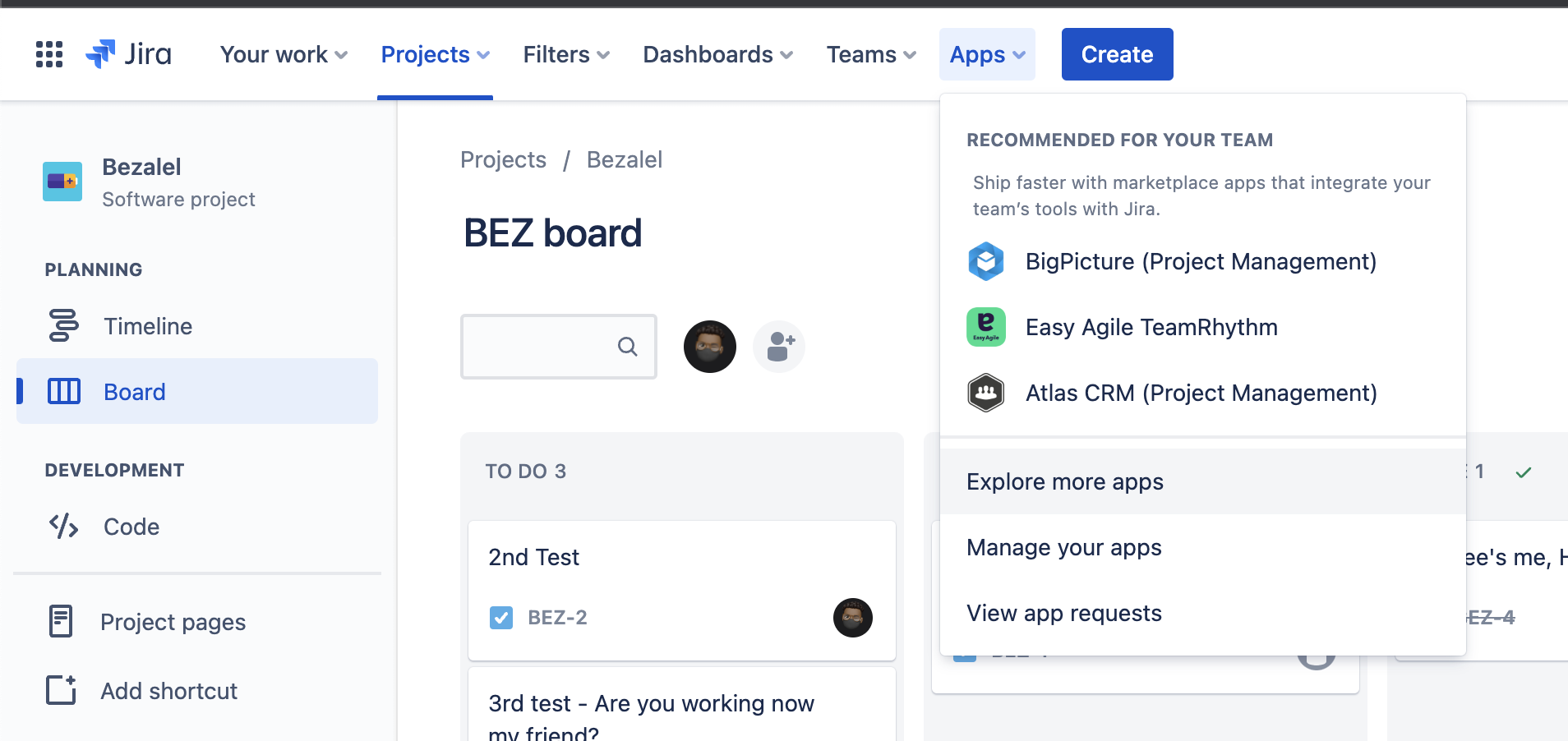
Step 2: Go to the newly installed app and click on configure

You'll find a field to put in personal access token
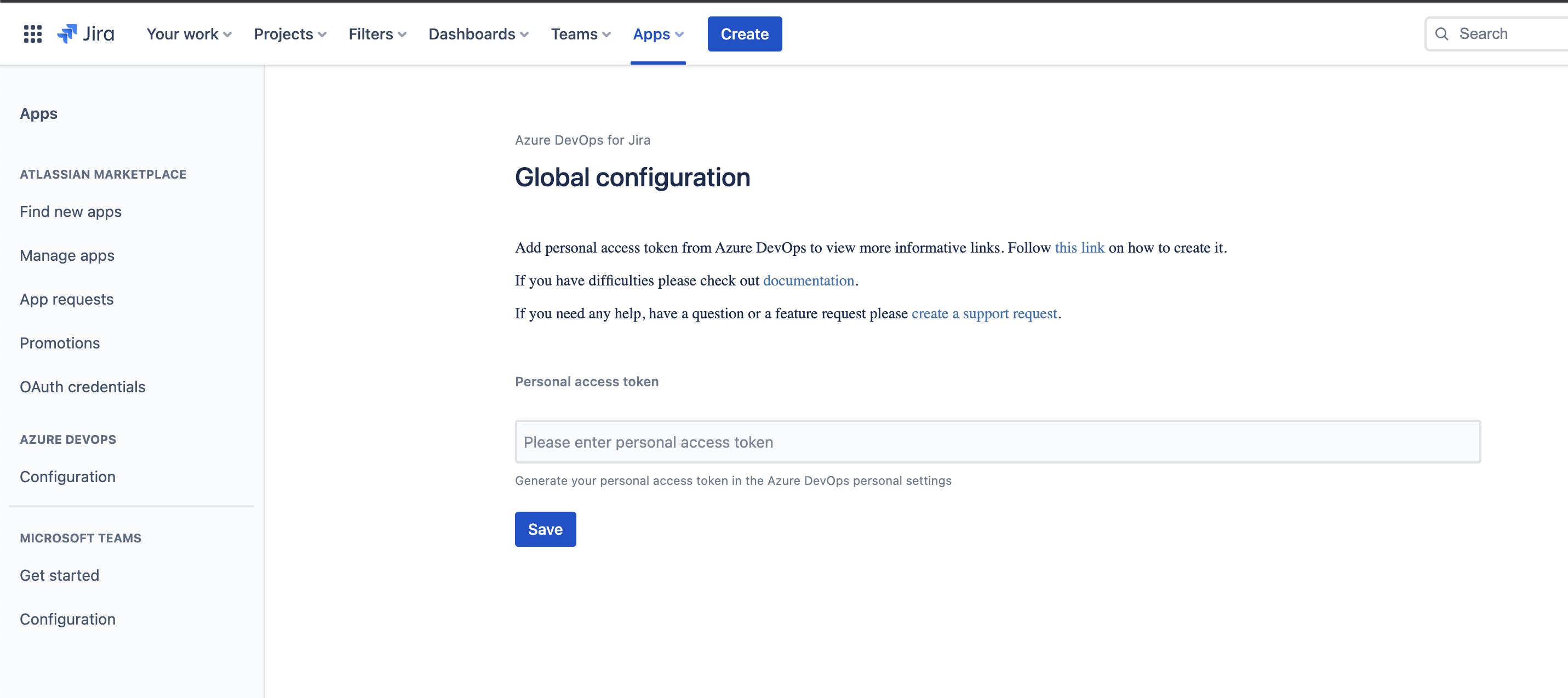
Step 3: Log in to your Azure DevOps to get your Personal Access Token. Make sure the user that would create the PAC is an administrator.

Make sure to click on full access and all accessible organizations

Copy the access token into the empty field on Jira.

Step 4: Once the personal access token is saved, proceed to make configurations.

Click on create to select the organization and the Azure DevOps project and there you go.

Azure DevOps for Jira supports Azure DevOps Cloud and On-Premises so you can enjoy the app regardless of your host. It is available for Jira Cloud - get started with a 30-day free trial.

What's next?

Once your Azure DevOps and Jira integration is set up, you can track branches, commits, pull requests, builds, and deployments directly from Jira issues. If your team also uses GitHub or GitLab alongside Azure DevOps, consider Jigit - the multi-provider Git integration for Jira to unify all your dev tools in one place.

For teams that also need to bridge their Azure DevOps data with Confluence documentation, the Azure DevOps Connector for Confluence lets you embed work items, builds, and pipeline data directly in Confluence pages.

Last updated: March 2026

Related Integration Guides

Articles you might like

Microsoft Azure DevOps For Jira Cloud
April 24, 2026
Microsoft Azure DevOps For Jira Cloud
With Azure DevOps for Jira, throughout the development process, your team can follow closely on Jira every linked branch, commits, pull requests and merges made on Azure DevOps - Imagine tracking a whole build with just a few Jira card issues.
Read more >
All You Need To Know About Microsoft Azure DevOps and Atlassian Jira
April 24, 2026
All You Need To Know About Microsoft Azure DevOps and Atlassian Jira
Microsoft Azure DevOps and Atlassian Jira are very powerful tools with features that help development teams successfully build products and manage their processes. While having different functionalities and strong points, many teams have found that the best way to get the most out of both platforms is to employ the CI/CD features of Azure DevOps while using the extensive project management features of Jira to drive their agile processes successfully.
Read more >

Articles you might like

New blog posts

5 CAD Workflows in Confluence That Replace "Can You Send Me a Screenshot?"
April 24, 2026
5 CAD Workflows in Confluence That Replace "Can You Send Me a Screenshot?"
Five practical Confluence workflows that let non-engineers view and interact with CAD files directly - eliminating the constant back-and-forth of screenshot requests between engineering and business teams.
Read more >
Autodesk Construction Cloud and Outlook Integration: Reduce Context-Switching for Teams
April 24, 2026
Autodesk Construction Cloud and Outlook Integration: Reduce Context-Switching for Teams
Stop switching between Outlook and Autodesk Construction Cloud. Here are three workflows you can handle entirely from your inbox with Outlook Integration for ACC by Move Work Forward.
Read more >
CAD Viewing in Confluence, Jira, and Outlook: View 70+ CAD Formats
April 24, 2026
CAD Viewing in Confluence, Jira, and Outlook: View 70+ CAD Formats
Engineering teams create CAD files. Everyone else needs to understand them. Here's how to bridge the gap across Confluence, Jira, and Outlook - without buying CAD licenses.
Read more >
Get productivity tips delivered straight to your inbox
Thank you! Your submission has been received!
Oops! Something went wrong while submitting the form.
Atlassian Logo
Platinum Marketplace Partner
AICPA Logo
SOC 2 Type II Certified
Gitlab Logo
GitLab Official partner
EU GDPR Logo
EU GDPR Compliant
Google Logo
Google Partner
Microsoft Logo
Microsoft Partner
